
Contact Information Anti-Deletion Tool
Convert sensitive text such as WeChat IDs and phone numbers into detection-proof text, effectively preventing it from being collapsed, blocked, or deleted on social platforms.
Loading tool, please wait...
If the online tool fails to load or run, try the desktop tool.https://tools.yikeaigc.com/
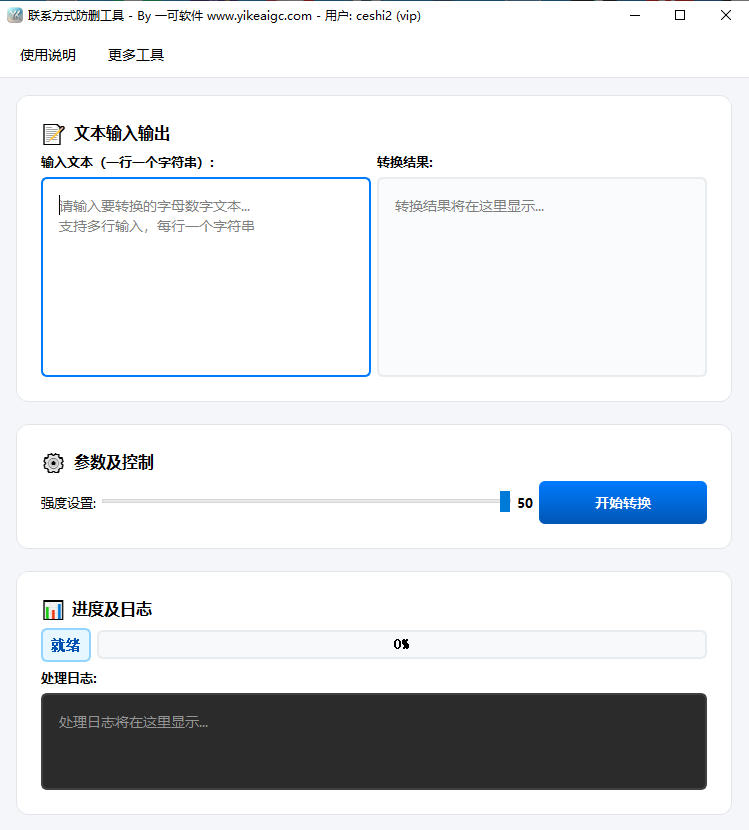
Tool Usage
Return to old version
A desktop version is available with more powerful, stable features.
Open desktop version
Windows 10/11 only
Contact Info Anti-Deletion Tool(Software Version)
Uses encoding to convert WeChat IDs, phone numbers, and other sensitive info into anti-detection fonts, helping prevent platform folding, blocking, or deletion.
New Anti-Detection Encoding
Custom anti-deletion stealth level (1-50)
Local batch processing protects data security
Click to go to the software download page
Instructions
Software Usage Instructions
- Enter text content: Enter the contact information or sensitive text you want to convert (such as a WeChat ID, mobile number, etc.) in the input box on the left. Batch input is supported, with one item per line.
- Set anti-deletion strength: Drag the "Strength Setting" slider to adjust the anti-deletion level (1-50). The higher the strength, the more invisible characters are inserted and the stronger the anti-detection ability, but the character length will also increase.
- Start conversion: Click the "Start Conversion" button, and the tool will automatically process the entered text.
- Copy the conversion result: After conversion is complete, the result will be displayed in the output box on the right. Simply copy the generated special-font text and paste it into Moments or a chat window to send it.
- View processing logs: You can view detailed processing progress and status information in the log area below.
FAQ
A: It is mainly used to prevent contact information sent on social platforms (such as WeChat IDs and phone numbers) from being automatically detected, blocked, collapsed, or deleted by the system. It works by converting regular characters into special characters.
A: Currently, conversion is supported for uppercase English letters (A-Z), lowercase English letters (a-z), and numbers (0-9). Chinese characters and other special symbols will be output unchanged and will not affect readability.
A: Platform rules vary, so please test it yourself!
A: Yes, on most modern smartphone and computer systems, it displays correctly in a bold mathematical symbol style.
A: Completely safe. This tool is a local software version, and all text processing is completed locally on your computer. No data will be uploaded to any server, so you can use it with confidence.
Related Tools
Network Traffic Consumption Tool
Professional network traffic consumption testing tool, su...
WhatsApp Direct Message Generator
Generate WhatsApp direct message links to send messages w...
Browser Fingerprint Detection Tool
Detect multidimensional fingerprints such as Canvas, WebG...
Computer Device Information Detection Tool
Detect detailed device information in real time, includin...