Font Format Converter
Supports batch conversion between six font formats: TTF/OTF/WOFF/WOFF2/EOT/SVG, with subsetting and CSS code generation
Browser execution mode: Your data is processed in your browser and is not uploaded to the server.
Speed and Stability: Processing speed depends on your device and browser. For large batch work, the desktop version may be more stable.
Loading tool, please wait...
If the online tool fails to load or run, try the desktop tool.https://tools.yikeaigc.com/
Tool Usage
Return to old versionBatch Font Format Converter(Software Version)
Batch convert between six font formats: TTF, OTF, WOFF, WOFF2, EOT, and SVG. Includes font subsetting, compression level control, and automatic @font-face CSS generation for web font optimization and cross-platform font adaptation.
Instructions
Software Usage Instructions
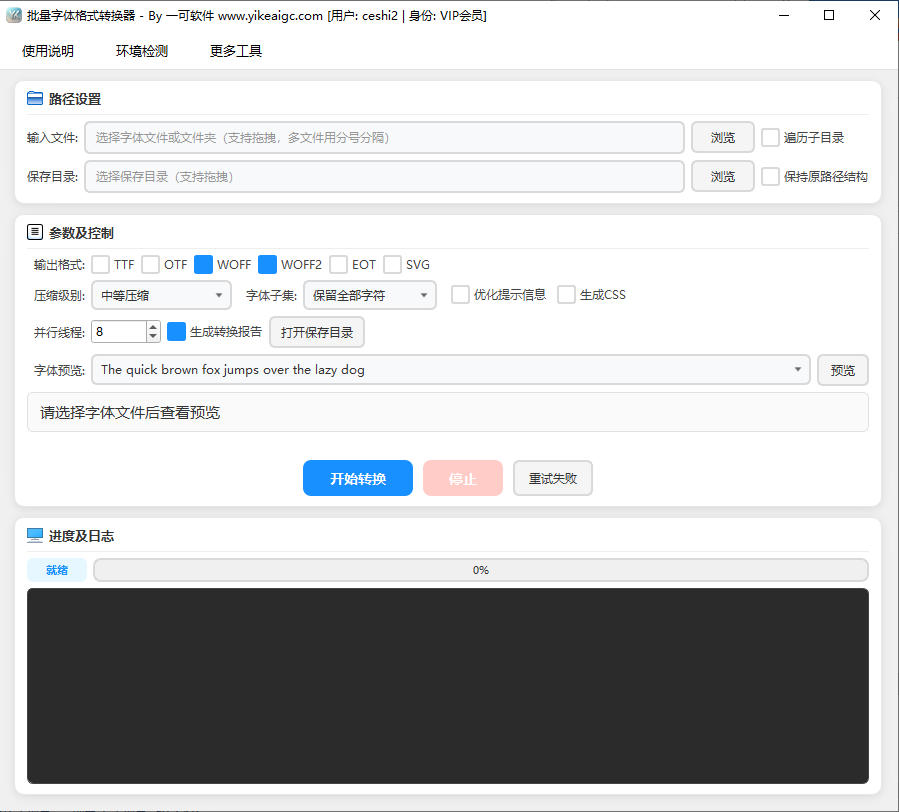
- Add font files: Click the "Add Files" button to select font files, or drag and drop font files directly into the software window. Five input formats are supported: TTF, OTF, WOFF, WOFF2, and EOT. You can add multiple files at once for batch processing.
- Select output formats: In the output format area, check the target formats you want to convert to. Six output formats are supported: TTF, OTF, WOFF, WOFF2, EOT, and SVG. You can select multiple formats for one-time output.
- Set the output directory: Click the "Select Output Directory" button to specify where the converted files will be saved. You can check the "Preserve Directory Structure" option to keep the original files' folder hierarchy in the output directory.
- Configure subsetting options (optional):
- Keep all characters: No trimming; keep all glyphs in the font
- Latin characters only: Keep only Latin letters, numbers, and common punctuation
- Chinese characters only: Keep CJK Chinese characters and basic Latin characters
- Custom character set: Enter the specific character text to keep
- Adjust compression level (optional): You can choose from no compression, low compression, medium compression, high compression, and other levels. The higher the compression level, the smaller the file, but the slower the conversion speed.
- Generate CSS code (optional): Check the "Generate @font-face CSS" option, and the software will automatically generate ready-to-use CSS code for the converted fonts, with support for setting the font-display property and custom font paths.
- Start conversion: Click the "Start Conversion" button, and the software will use multithreading to process all font files in parallel. You can view real-time progress and log information during conversion.
- View results: After conversion is complete, the software will display success/failure statistics and a detailed conversion report. You can open the output directory directly to view the converted font files.
Frequently Asked Questions
Related Tools
Hexadecimal to Binary Converter
Convert hexadecimal numbers to binary code, with support ...
Latitude and Longitude Coordinate Converter
Supports coordinate system conversion such as WGS84, GCJ0...