Batch Video and Audio Voice Changer Software
Batch voice changing for video and audio files, with multiple built-in voice presets, support for custom pitch shifting and reverb, and batch folder processing.
Loading tool, please wait...
If the online tool fails to load or run, try the desktop tool.https://tools.yikeaigc.com/
Tool Usage
Return to old versionBatch Video & Audio Voice Changer(Software Version)
Video and audio voice changing requires heavy processing such as audio track decoding, pitch shifting, reverb, and repackaging. To provide a more stable and smooth batch processing experience, this feature is available only in the Windows desktop client.
Instructions
Software Usage Instructions
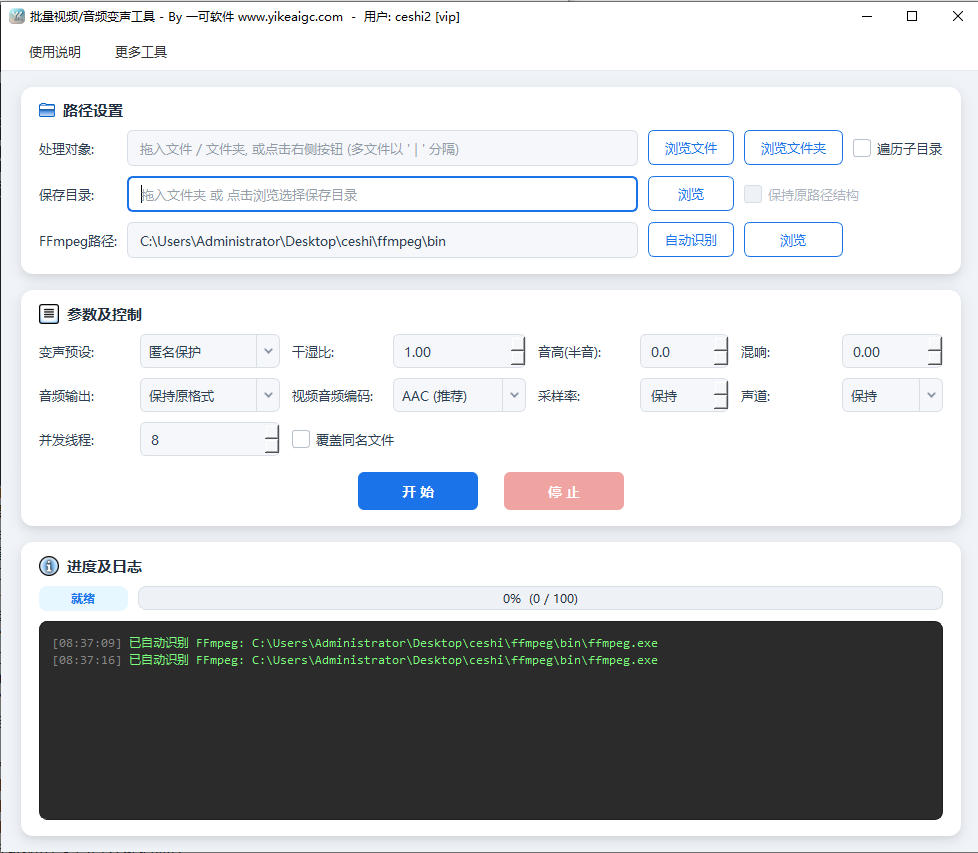
- Add files: Click the "Select File" or "Select Folder" button, or directly drag and drop video files, audio files, or entire folders into the software window. Video formats such as MP4, MOV, AVI, and MKV are supported, as well as audio formats such as MP3, WAV, M4A, and FLAC.
- Traverse subdirectories: When importing a folder, you can check "Traverse subdirectories" to process all media files in nested folders, and select "Keep original path structure" to maintain the original directory hierarchy for output files.
- Select a voice-changing preset: Choose the desired effect from the 35 built-in voice-changing presets, for example:
- Character voices: Male to female, female to male, loli voice, uncle voice, child voice, monster voice, alien voice, etc.
- Scene sound effects: Telephone voice, walkie-talkie voice, radio host, news broadcast voice, livestream microphone voice, documentary narration voice, etc.
- Atmosphere effects: Echo cave, spatial reverb, horror atmosphere voice, ethereal fantasy voice, tunnel echo voice, etc.
- Anonymity protection: Slight anonymous voice change, strong anonymity protection voice, used to hide original voiceprint characteristics
- Customize parameters: After selecting the "Custom" preset, you can adjust pitch shifting and reverb parameters yourself, and set the dry/wet ratio to control the strength of the voice-changing effect.
- Configure output options:
- Output directory: Set the save location for processed files
- Audio output format: Keep the original format, or convert to MP3, WAV, M4A, FLAC, OGG, OPUS, etc.
- Video audio track encoding: For video files, you can choose audio track encoding methods such as AAC and MP3
- Concurrent threads: Adjust the number of files processed simultaneously according to device performance
- Start processing: Click the "Start Processing" button, and the software will automatically complete batch voice changing and output. Processing progress and logs will be displayed in real time. After completion, go to the output directory to view the results.
FAQ
Related Tools
Audio Left and Right Channel Balance Adjustment Tool
Adjust the left and right audio channel balance online, w...
Automatic Audio Gap Trimming Tool
Automatically detect and remove silence segments and brea...
Batch Audio Volume Adjustment Tool
Increase, decrease, and normalize audio volume online. Su...
Batch Audio Vocal Separation Tool
Batch separate vocals and accompaniment from music, with ...
Audio and Video Duration Filter Tool
Batch analyze the duration information of audio and video...
Online Audio Flanger Effect Tool
Add a professional flanger effect to audio, with paramete...
Audio Background Music Adding Tool
Batch add background music to audio files, with fixed or ...