Audio Fingerprint Duplicate Checker
Using voiceprint fingerprint comparison, automatically find duplicate and similar audio in massive audio collections. Supports cross-format and cross-bitrate recognition, with one-click organization and deduplication.
Loading tool, please wait...
If the online tool fails to load or run, try the desktop tool.https://tools.yikeaigc.com/
Tool Usage
Return to old versionAudio Fingerprint Duplicate Finder(Software Version)
Audio fingerprint extraction and large-scale similarity matching require significant computing resources. To provide a more stable and efficient experience, this feature is available only in the Windows desktop client.
Instructions
Software Usage Instructions
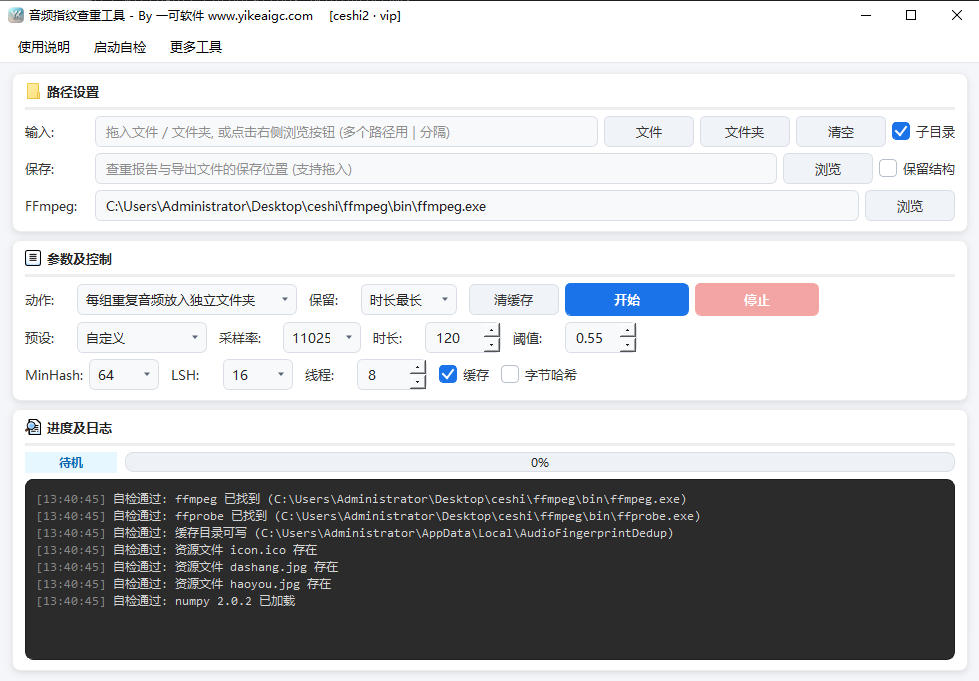
- Add audio files: Enter the path to an audio file or folder in the "Input Path" box, or drag files or folders directly into the input box. Single files, multiple files, and mixed multiple-folder input are supported. Separate multiple paths with |.
- Set the scan range: Check "Traverse subdirectories" to recursively scan subdirectories at all levels; after checking "Keep original path structure", exported files will be saved according to the original folder hierarchy instead of being flattened into the same directory.
- Set the save directory: Used to store duplicate check reports and exported files. Path drag-and-drop is also supported.
- Select a processing action:
- Archive by group: Create a separate folder for each duplicate group, place all files in the group inside it, and add the [KEEP]_ prefix to the kept item
- Extract deduplicated audio: Keep one copy from each group, add non-duplicate standalone files, and organize a clean media library
- Export by category: Copy files separately into the "Kept Audio" and "Duplicate Audio" directories
- Safe isolation: Copy extra duplicates to a review directory and generate a list, without deleting or moving the original files
- Generate report only: Only produce a CSV report without copying any audio files
- Adjust parameters (optional): You can first select a "Parameter Preset" (Strict Duplicate Check, General Recommended, Loose Similarity Search, Large-Scale Initial Screening, Full Detailed Check), then fine-tune the decoding sample rate, analysis duration limit, similarity threshold, number of parallel threads, and more. The default parameters are suitable for most scenarios.
- Start processing: Click "Start". The tool will first extract audio fingerprints to complete duplicate detection, then automatically organize files according to the selected action.
- View results: After processing is complete, a CSV report will be generated in the save directory (including similarity, match type, duration, bitrate, sample rate, SHA1, and other information), and the corresponding organized directories will be created according to the processing action.
FAQ
Related Tools
Audio Quality Inspection Report Tool
Batch-check audio sample rate, clipping, pops, silence, l...
Batch Audio Intro and Outro Remover
Batch remove a specified duration from the beginning and ...
Automatic Audio Gap Trimming Tool
Automatically detect and remove silence segments and brea...
Online Audio Flanger Effect Tool
Add a professional flanger effect to audio, with paramete...
Online Audio Distortion Effect Tool
Professional audio distortion processing, supporting four...