
Pexels Stock Video Batch Downloader
A Pexels video bulk downloader designed for self-media creators, supporting automatic filtering and downloading by keyword, quality, and duration.
Loading tool, please wait...
If the online tool fails to load or run, try the desktop tool.https://tools.yikeaigc.com/
Tool Usage
Return to old version
A desktop version is available with more powerful, stable features.
Open desktop version
Windows 10/11 only
Pexels Stock Video Bulk Downloader(Software Version)
An efficient asset sourcing tool for content creators. Bulk download royalty-free HD videos via the Pexels API, with powerful keyword search, quality filters, and auto-categorization to save time.
Bulk auto-download with multiple keywords
Smart filters for orientation, duration, and quality
Auto API key rotation to bypass rate limits
Click to go to the software download page
Instructions
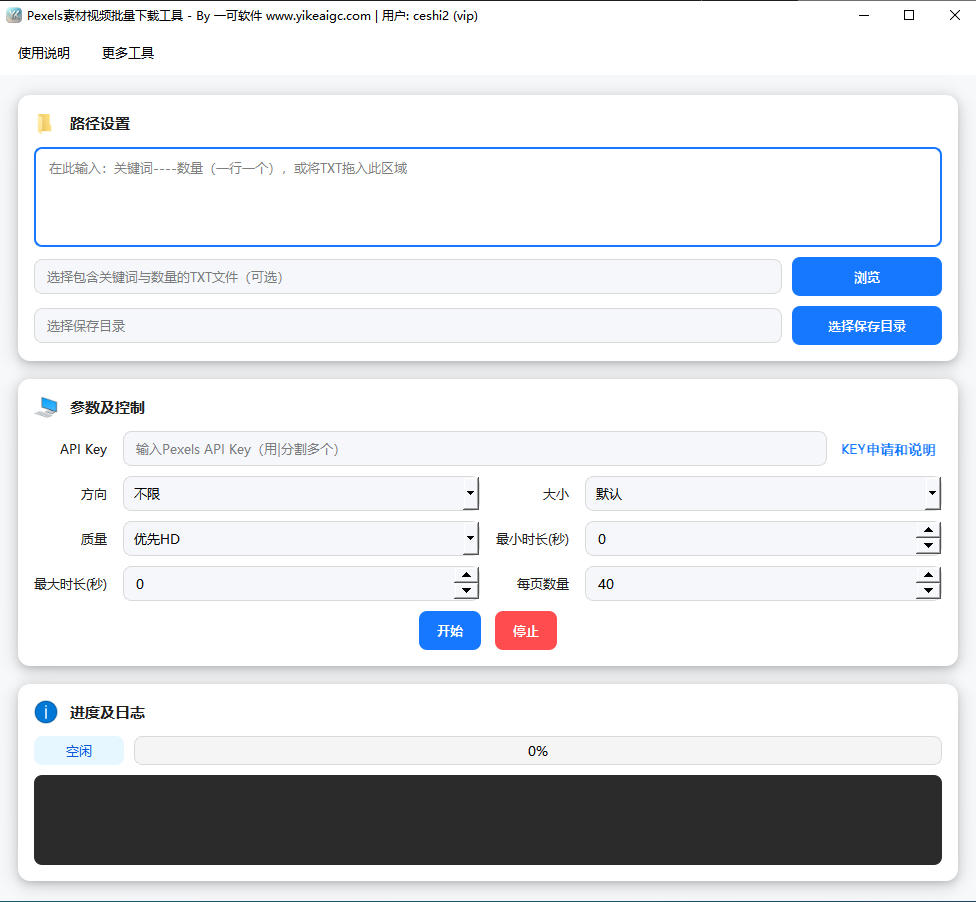
Software Usage Instructions
- Preparation:
- Apply for a Pexels API Key (it is recommended to prepare multiple keys to handle rate limits, separated by "|")
- Prepare a TXT keyword file in the format "keyword----quantity", one entry per line (e.g., travel----50)
- Path Settings:
- Enter the keyword configuration directly in the input box, or drag the prepared TXT file into the software area
- Click the "Select Save Directory" button to set where video files will be stored
- Parameter Configuration:
- API Key: Enter your Pexels API Key
- Filters: Select the required video orientation (landscape/portrait/square), video size, and quality mode (prefer HD/SD only, etc.)
- Duration Control: Set the minimum and maximum video duration (seconds)
- Start Downloading: Click the "Start" button, and the software will automatically create subfolders by keyword and download videos.
- Monitor Progress: The interface displays the current download progress and logs in real time. If a rate limit is encountered, the Key will be automatically rotated.
FAQ
A: The TXT file content must strictly follow this format: keyword----quantity, one entry per line. For example:
natural scenery----20 means downloading 20 videos related to natural scenery. If the format is incorrect, the software will automatically skip that line.
A: This tool is developed based on the official Pexels API, so a valid API Key is required to retrieve data. You can apply for a Key for free on the Pexels official website. The software supports entering multiple Keys (separated by a vertical bar |). When one Key reaches the request limit, it will automatically switch to the next one to ensure downloads are not interrupted.
Answer: No. The software has a built-in smart deduplication mechanism that automatically records downloaded video links and skips duplicate resources. If a local file name already exists but the content is different, the software will automatically append a number to the file name (such as _1, _2) when saving, without overwriting existing files.
Answer: Yes. In the "Orientation" option in the parameter settings area, simply select Portrait. This is ideal for users who need to download short video materials for TikTok, Shorts, or Reels. It also supports filtering specifically for landscape or square videos.
Answer: Download speed mainly depends on your network environment, so we recommend checking your network connection. If it says "No more results," it means that for the current keyword, under the filters you set (such as a specific duration or orientation), there are no more matching videos in the Pexels library. Try changing the keyword or loosening the filters.
Related Tools
Video Aspect Ratio Adjustment Tool
Professional video aspect ratio calculator and adjustment...
Batch Video Duration Spoofing Tool
Batch edit video metadata duration information, supportin...
Batch Video Picture-in-Picture Compositing Tool
Automatically pair main videos and picture-in-picture ass...