
Batch Video Duration Spoofing Tool
Batch edit video metadata duration information, supporting fixed or random durations, with no re-encoding required. Fast processing without affecting image quality.
Loading tool, please wait...
If the online tool fails to load or run, try the desktop tool.https://tools.yikeaigc.com/
Tool Usage
Return to old version
A desktop version is available with more powerful, stable features.
Open desktop version
Windows 10/11 only
Batch Video Duration Spoofer(Software Version)
Quickly spoof the displayed video duration by editing metadata. No re-encoding, fast processing, with no impact on video quality or actual playback.
Supports batch processing of MP4, MOV, and other formats
Fixed or random duration modes
Supports scanning subfolders and preserving the original path structure
Local processing for privacy and security
Click to go to the software download page
Instructions
Software Usage Instructions
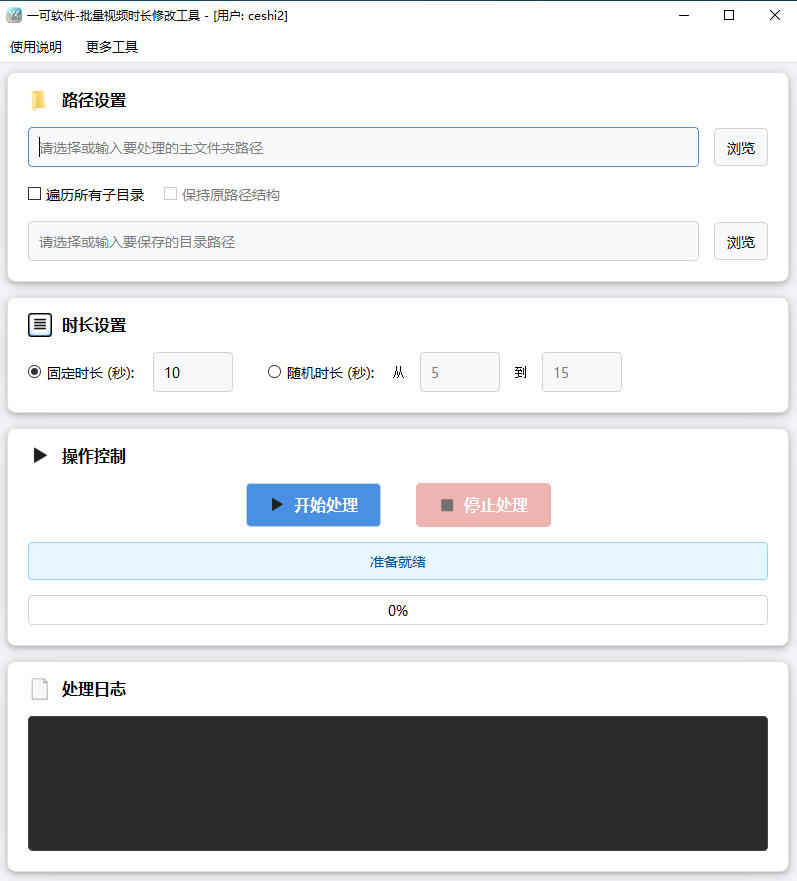
- Select the main folder: Click the "Browse" button and select the folder containing the video files to be processed. Common video formats such as MP4, MOV, and M4V are supported.
- Subdirectory traversal settings:
- Traverse all subdirectories: When checked, the program will process video files in the main folder and all of its subdirectories
- Keep original path structure: When traversing subdirectories, check this option to keep the output videos in the same directory structure as in the main folder
- Select the save directory: Click the "Browse" button to set the location for the processed videos. Note: The save directory cannot be the same as the main folder.
- Duration settings:
- Fixed duration: All videos will be modified to the specified number of seconds
- Random duration: The duration of each video will be randomly generated between the minimum and maximum number of seconds you set
- Start processing: Click the "Start Processing" button to start the task. The processing progress will be displayed in real time in the progress bar.
- Stop processing: If you need to interrupt the task, click the "Stop Processing" button to safely stop the current operation.
FAQ
A: It will not affect video quality. This tool only modifies the metadata header information of the video file and does not re-encode the video, so the video quality, audio quality, and actual playback content will not change in any way.
A: No. This tool only modifies the displayed duration information (metadata) of the video file. The actual playback duration and content of the video remain unchanged. The player will display the disguised duration during playback, but the actual length of the played content is not affected.
A: Currently, MP4, MOV, M4V, and other video formats based on the ISO Base Media File Format standard are supported. These formats use the same atom structure to store metadata, so duration disguising can be achieved by modifying the mvhd and mdhd atoms.
A: Fixed duration mode changes the display duration of all videos to the number of seconds you specify; Random duration mode randomly generates a duration for each video between the minimum and maximum values you set, making it suitable for scenarios where you want video durations to look more natural and varied.
A: To protect your original video files from being overwritten, the program requires the main folder and save directory to be different. Processed videos will be saved to the specified save directory, while the original files remain unchanged, making it easy to compare results or restore the original files if needed.
A: Because this tool only modifies file header information instead of re-encoding, processing is very fast. However, when processing many files, we recommend: 1) make sure the save directory has enough disk space; 2) click the "Stop Processing" button at any time if you need to interrupt the process; 3) view real-time progress in the log area during processing.
A: Possible reasons include: 1) the video file is not in standard MP4/MOV format; 2) the video file is corrupted or has an abnormal structure; 3) the video file is missing required moov/mvhd metadata. We recommend using video files in a standard format, or first converting the video to standard MP4 format with a video conversion tool before processing.
Related Tools
Pexels Stock Video Batch Downloader
A Pexels video bulk downloader designed for self-media cr...
Batch Video Volume Reduction Tool
Batch remove audio from videos or adjust volume. Supports...
Video Mashup Tool (Auto-Match Subtitles to Footage)
Intelligently matches subtitle keywords with local assets...