
Batch Random Video Merger
Randomly extract video clips from multiple folders and batch merge them to generate multiple brand-new videos, with support for custom resolution, frame rate, and encoding parameters.
Loading tool, please wait...
If the online tool fails to load or run, try the desktop tool.https://tools.yikeaigc.com/
Tool Usage
Return to old versionBatch Video Random Merger(Software Version)
Random video selection, transcoding, and multi-clip merging require heavy computing resources. For a more stable and efficient experience, this feature is only available in the Windows desktop client.
Instructions
Software Usage Instructions
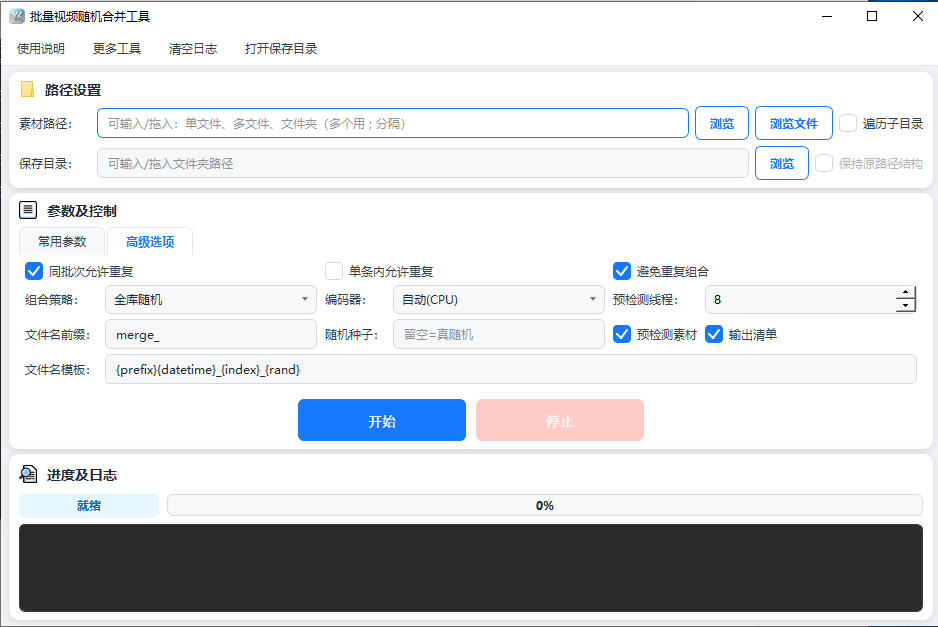
- Add video materials: Click "Browse" next to "Material Path" to select a folder, or click "Browse Files" to select multiple videos. You can also drag files/folders directly into the input box. Single files, multiple files, and multiple folders can be added together; separate multiple paths with semicolons. Check "Traverse Subdirectories" to recursively scan videos at all levels.
- Set the save directory: Select the output folder for the merged videos under "Save Directory". If the directory does not exist, it will be created automatically. When used with "Traverse Subdirectories", you can check "Keep Original Path Structure" to restore the relative directory hierarchy of the materials.
- Select a quick preset: You can choose preset combinations such as vertical short video, horizontal HD, ultra-fast lossless concatenation, and web WebM under "Quick Presets". After selecting one, you can still manually fine-tune each parameter.
- Configure common parameters:
- Number of videos to generate: The number of videos to generate in this batch
- Segments per video: How many material segments each new video is merged from, usually 2–6 segments
- Output format and resolution: Select container formats such as mp4, mov, mkv and the target resolution
- Frame adaptation: When resolutions are inconsistent, choose from black border fit, crop to fill, stretch to fill, or blurred background
- Frame rate, audio processing, encoding mode, CRF, Preset: Adjust quality and speed as needed
- Set advanced options: In "Advanced Options", you can set the combination strategy (random from entire library/same-directory combination/cross-directory mixing), whether repeats are allowed, file name prefix and template, random seed, material pre-check, output list, and more.
- Start merging: Click the "Start" button, and the tool will automatically randomly select and merge materials. The progress and log area will display processing progress in real time. After processing is complete, you can view the generated videos in the save directory.
FAQ
Related Tools
Batch Video Picture-in-Picture Compositing Tool
Automatically pair main videos and picture-in-picture ass...
Video and Audio Parameter Report Export Tool
Read audio and video codec, bitrate, frame rate, sample r...
Video Frame Image Extraction Tool
Batch extract frame images from videos, with support for ...
Video Mashup Tool (Auto-Match Subtitles to Footage)
Intelligently matches subtitle keywords with local assets...
Batch Video Floating Watermark Tool
Batch add floating watermarks to videos, with support for...