
AI Foreign Trade Bulk Customer Acquisition Tool
Uses AI large models to intelligently identify potential global foreign trade customers, with support for bulk acquisition, automatic deduplication, and multi-format export.
Loading tool, please wait...
If the online tool fails to load or run, try the desktop tool.https://tools.yikeaigc.com/
Tool Usage
Return to old versionAI Bulk Lead Generation Tool for Global Trade(Software Version)
Use AI large models to find global prospects. Customize product info, target regions, and customer profiles, get high-quality foreign trade leads in bulk, auto-deduplicate, and export results.
Instructions
Software Usage Instructions
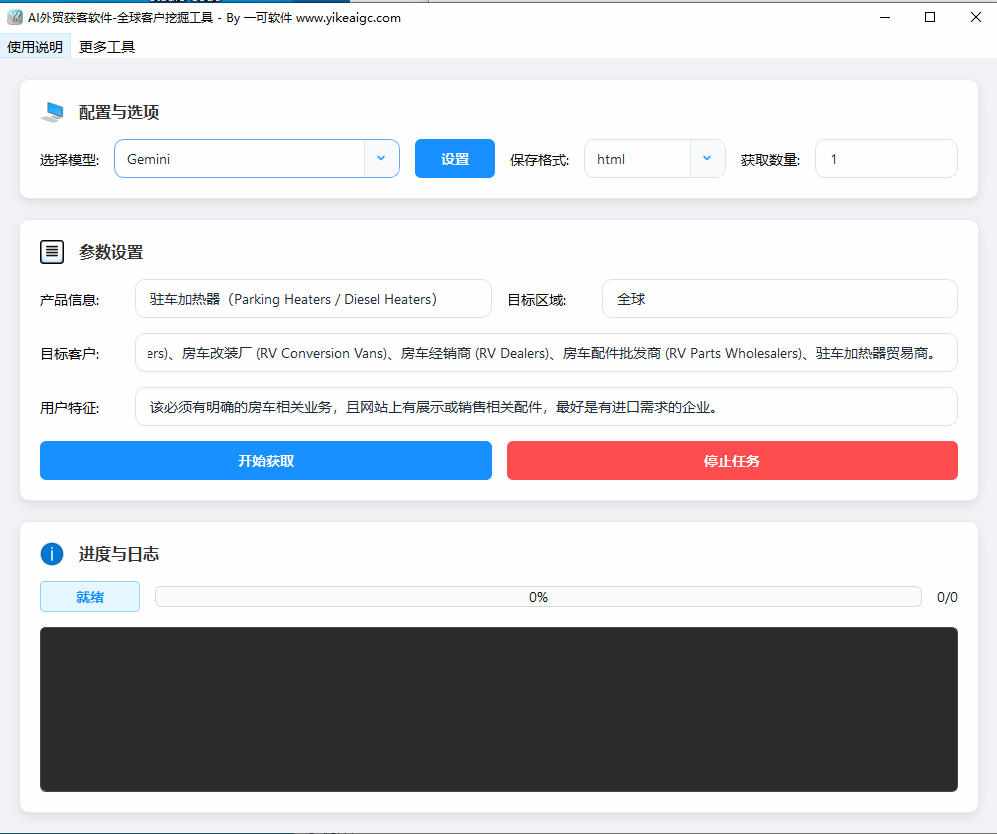
- Configure the AI model: When using it for the first time, click the "Settings" button to the right of "Select Model" on the main interface to add AI model configuration information. You need to enter a display name, API address, API Key, and model name, and select the interface type (OpenAI-compatible interfaces and the official DeepSeek interface are supported). After saving, it is ready to use.
- Enter lead generation parameters: Fill in the following information on the main interface:
- Product information: Enter your product name or description, such as "parking heater"
- Target customers: Enter the target customer type, such as "RV manufacturers, modification shops, distributors"
- Target region: Enter the target market region, such as "global", "Europe", or "North America"
- User characteristics: Enter a description of your ideal customer, such as "companies with clear import needs"
- Select model and export format: Select a configured AI model from the drop-down list, choose the save format (txt plain text/md Markdown/html web page format), and enter the number of customers you want to obtain.
- Start acquisition: Click the "Start Acquisition" button, and the program will automatically call the AI model to obtain customer information one by one. After each customer is obtained, it will pause for 3 seconds to avoid overly frequent requests. You can view the progress in real time in the log area during the process.
- View results: The obtained customer information is automatically saved in the results folder under the software directory, with each customer saved as a separate file. The program automatically records already obtained customers and removes duplicates to avoid repeated acquisition.
- Stop task: If you need to stop midway, click the "Stop Task" button to safely terminate the current acquisition task.
FAQ
Related Tools
Bilingual Subtitle Translation Tool
Smart subtitle translation tool supporting SRT and VTT fo...
AI Article Rewriting and Originality Tool
Pass plagiarism detection! Pass AI article detection! Sup...
AI Video Quality Assessment Classification Tool
Uses a large model to score AI-generated videos across si...
Word Format-Preserving Translation Tool
Supports DOCX document translation while preserving forma...
AutoGLM Mobile AI Assistant for PC
A mobile automation tool based on Zhipu AI that controls ...
AI Image Generation Tool (Bulk Supported)
An AI-powered batch image generation and editing tool sup...