
AI Video Quality Assessment Classification Tool
Uses a large model to score AI-generated videos across six dimensions, identify major issues such as taking off in place, clipping, and subject jumps, and automatically classify and archive them based on thresholds.
Loading tool, please wait...
If the online tool fails to load or run, try the desktop tool.https://tools.yikeaigc.com/
Tool Usage
Return to old versionAI Video Quality Evaluation & Sorting Tool(Software Version)
AI video multi-dimensional scoring, flaw detection, and batch sorting require large model calls and local concurrent processing. To ensure stable, fast evaluation at scale, this feature is available only in the Windows desktop client.
Instructions
Software Usage Instructions
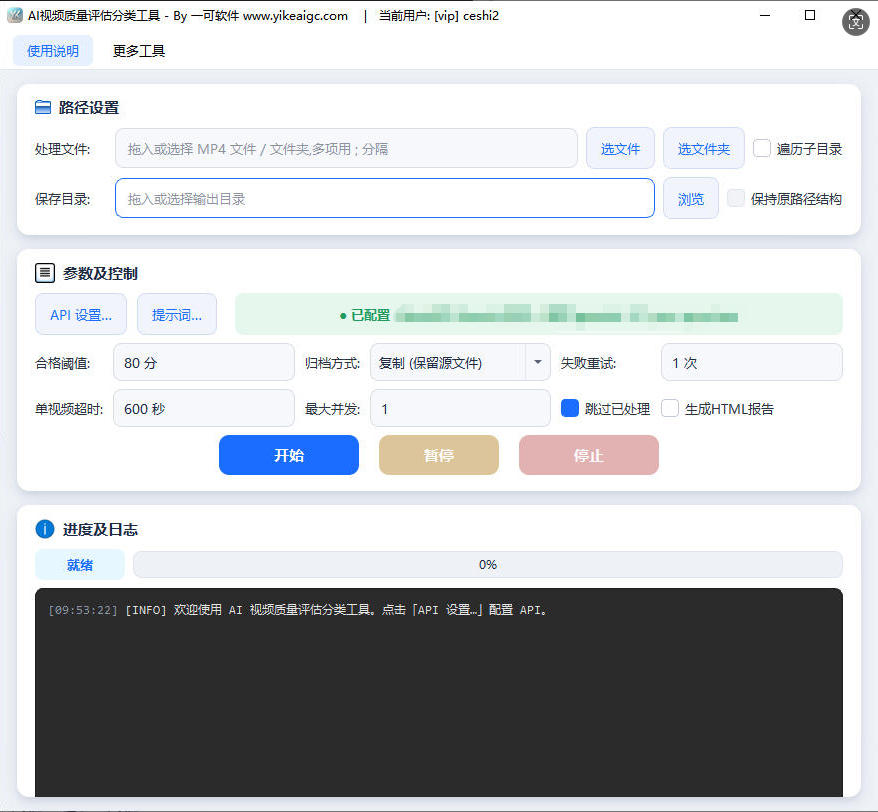
- Configure API access: In "API Settings", select the native Gemini format, enter the Base URL and API Key for NewAPI or a compatible platform, and choose a model that supports video understanding (such as gemini-3-pro-preview).
- Add videos to evaluate: Click "Add File" or "Add Folder" to select the MP4 videos to review. Recursive subdirectory scanning is supported, and you can also drag files directly into the window.
- Set evaluation parameters:
- Score threshold: Set an overall score threshold between 0 and 100. Videos with scores not lower than the threshold are considered qualified.
- Number of concurrent threads: Adjust based on API rate limits and network conditions. Commonly 2-5 threads.
- Request timeout: The maximum waiting time in seconds for a single evaluation. For large files, it is recommended to increase this appropriately.
- Select output directory: Specify the root directory for saving. The tool will automatically create two subdirectories under it: "Qualified" and "Unqualified", while preserving the original relative path structure.
- Configure additional options:
- Generate HTML report: After processing, summarize the scores and issues of all videos into a visual report.
- Resume evaluation: Match existing CSV records based on file fingerprints and configuration, and skip videos that have already been evaluated.
- Preserve original structure: In recursive mode, archive files according to their relative paths from the source.
- Start evaluation: Click the "Start Evaluation" button. The tool will send the video to the large model via inlineData and parse the returned six-dimensional scores and issue list.
- View and export results: After processing is complete, you can view the score and critical issue description for each video in the real-time log, and obtain CSV details, individual JSON reports, and an HTML summary in the output directory.
FAQ
Related Tools
AI Image Generator (Image-to-Image)
AI-powered intelligent image editing tool supporting sing...
AI Video Generation Tool (Batch Supported)
sor2 model, supports text-to-video and image-to-video, ca...
AutoGLM Mobile AI Assistant for PC
A mobile automation tool based on Zhipu AI that controls ...
AI Article Rewriting and Originality Tool
Pass plagiarism detection! Pass AI article detection! Sup...
Word Format-Preserving Translation Tool
Supports DOCX document translation while preserving forma...
AI Foreign Trade Bulk Customer Acquisition Tool
Uses AI large models to intelligently identify potential ...
SRT/VTT Subtitle Translation Tool
Supports translation of SRT and VTT subtitle files while ...