Xiaohongshu Memo-Style Cover Maker
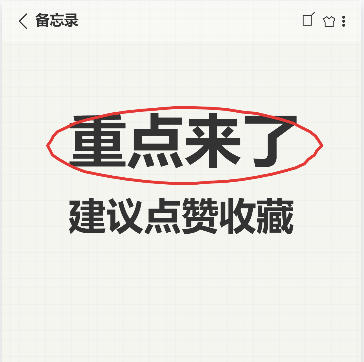
Simulate a mobile notes interface with a grid background, handwritten fonts, and hand-drawn red circle annotations to create an eye-catching note-style cover.
Browser execution mode: Your data is processed in your browser and is not uploaded to the server.
Speed and Stability: Processing speed depends on your device and browser. For large batch work, the desktop version may be more stable.
Loading tool, please wait...
If the online tool fails to load or run, try the desktop tool.https://tools.yikeaigc.com/

Tool Usage
Return to old versionEnter text, then click "Generate Batch Covers"
Instructions
Software Usage Instructions
- Select a creation mode: Click the tabs at the top to choose "Single Creation" or "Batch Creation" mode. Single mode is suitable for fine adjustments, while batch mode is suitable for quickly generating multiple covers.
- Set the canvas size:
- Manually enter the width and height (unit: pixels)
- You can also click preset buttons to quickly choose common sizes such as Douyin 9:16, Xiaohongshu 3:4, square, iPhone, and more
- Configure the background style:
- Solid color background: Choose a background color. The default is light beige to simulate notebook paper
- Image background: Upload a custom image as the background. The image will automatically stretch to the canvas size
- Grid lines: Adjust the grid color and spacing, or turn off the grid display
- Edit text content:
- Click the "Add Row" button to add a new text row
- Each row can have its own text content, font size, and color
- Supports selecting built-in fonts or uploading custom font files (TTF/OTF/WOFF formats)
- Set the hand-drawn circle effect:
- Choose a circle style: ellipse, circle, wavy line, underline, or box
- Adjust the circle color and line thickness
- Choose which text rows to circle (all, specified rows, or the last row)
- Fine-tune the horizontal/vertical offset and scale ratio
- Add decorative icons (optional): After checking the option, you can choose emoji icons and adjust their size and position.
- Use quick examples: Click an example button to quickly load a preset cover style for easy reference and editing.
- Export the image: Select the export format (PNG/JPEG/WebP) and quality, then click "Download Cover Image" to save it.
- Batch creation:
- Enter multiple lines of content in the text box, with each line representing one cover
- Use the | symbol to separate different text rows on the same cover
- Select a batch style template and click "Generate Batch Covers"
- Preview the first 20 results, then click "Download All (ZIP)" to download all covers as a package
FAQ
Related Tools
Batch Image Page Numbering Tool
Batch add page numbers and numbering to images, with recu...
CSS Animated Gradient Background Generator
Create animated gradient backgrounds online, with support...
Batch Image Black Border Remover
Batch-detect and crop black borders, white borders, and c...
PNG Compression Optimization Tool
Batch compress PNG images online, supporting color reduct...