
Batch Image Page Numbering Tool
Batch add page numbers and numbering to images, with recursive folder support and customizable page number position, font, size, color, and starting number.
Loading tool, please wait...
If the online tool fails to load or run, try the desktop tool.https://tools.yikeaigc.com/
Tool Usage
Return to old versionBatch Image Page Numbering Tool(Software Version)
Adding page numbers and labels to many images in batches requires stable local processing. For a smoother experience, this feature is available as a Windows desktop client.
Instructions
Software Instructions
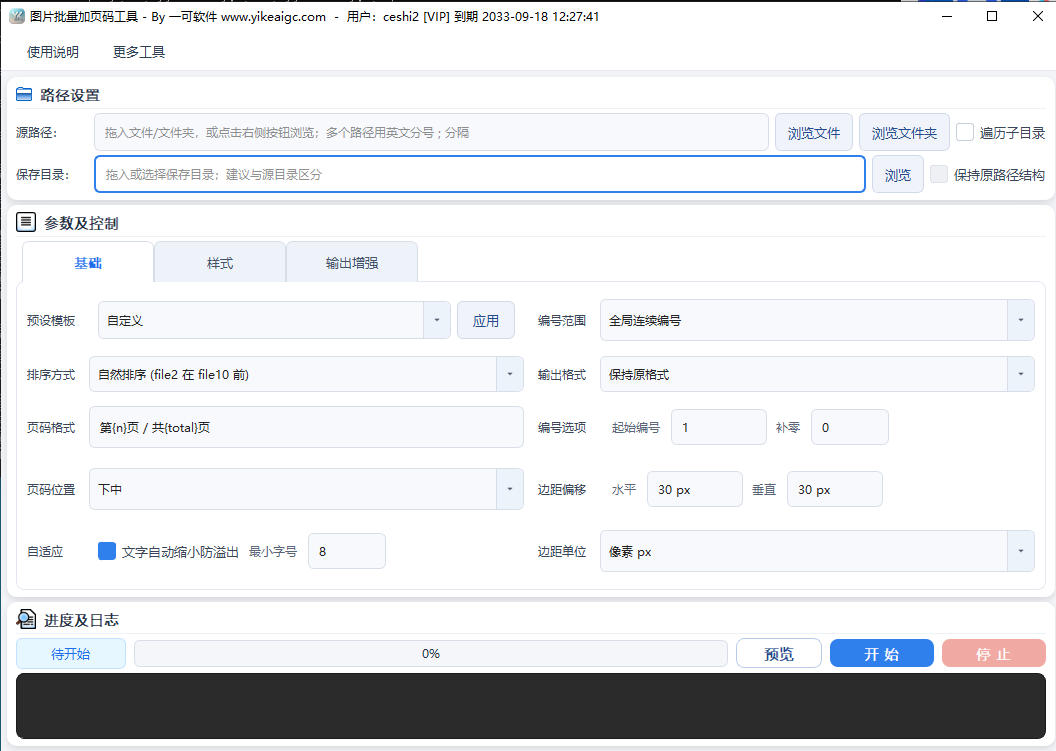
- Add image sources: Click the select button or drag in the images you want to process. Single files, multiple files, and entire folders are supported. After checking "Recursive subfolders", images at all levels within the folder can be processed together.
- Set page number content: Enter the page number style in the format box. Placeholders such as {n} current number, {total} total count, {name} file name, {folder} folder name, and {date} date are supported. You can also set the starting number and zero-padding digits (such as 001, 002).
- Select numbering range: Choose global continuous numbering, or number each folder independently, suitable for images in different chapters or groups.
- Adjust position and style:
- Page number position: Nine positions are available: top left, top center, top right, middle left, center, middle right, bottom left, bottom center, and bottom right. Horizontal and vertical offsets can also be fine-tuned.
- Text style: Customize the font, font size, color, and opacity, and enable stroke, shadow, and a semi-transparent background box to keep page numbers clearly visible on various image backgrounds.
- Configure output options: Select the output format (keep original format / JPG / PNG / WEBP) and naming suffix. You can choose to preserve the original directory structure and image metadata, and set the number of concurrent threads.
- Preview and start processing: After confirming the effect through the real-time preview, click the start button. The tool will batch-add page numbers to all images according to the settings and output them to the specified directory.
FAQ
Related Tools
Image Circle Number Labeling Tool
Add numbered circle markers to images, supporting single-...
Xiaohongshu Memo-Style Cover Maker
Simulate a mobile notes interface with a grid background,...
Batch Full-Screen Text Watermark for Images
Batch add full-screen tiled text watermarks to images wit...
Image Deduplication Tool (Detection Bypass)
Batch image deduplication tool that makes it easy to pass...
ID Photo Background Color Changer
Intelligently identifies the subject and changes ID photo...
Image Similarity Detection (PDQ Algorithm)
An online image similarity detection tool based on the PD...
Xiaohongshu Book Quote Style Cover Maker
Book and notebook quote cover, with a gray textured backg...