Face Image Search Tool
Local batch face comparison and search software. Quickly find and extract photos containing a specific face from massive image collections with one click, supporting high-precision face recognition.
Loading tool, please wait...
If the online tool fails to load or run, try the desktop tool.https://tools.yikeaigc.com/
Tool Usage
Return to old version
A desktop version is available with more powerful, stable features.
Open desktop version
Windows 10/11 only
Face Image Finder(Software Version)
Face recognition and feature matching require significant computing resources. To provide a more stable and efficient experience, this feature is available only in the Windows desktop client.
Quick face matching for large image sets
Smart face similarity detection
Local offline processing protects photo privacy
Click to go to the software download page
Instructions
Software Usage Instructions
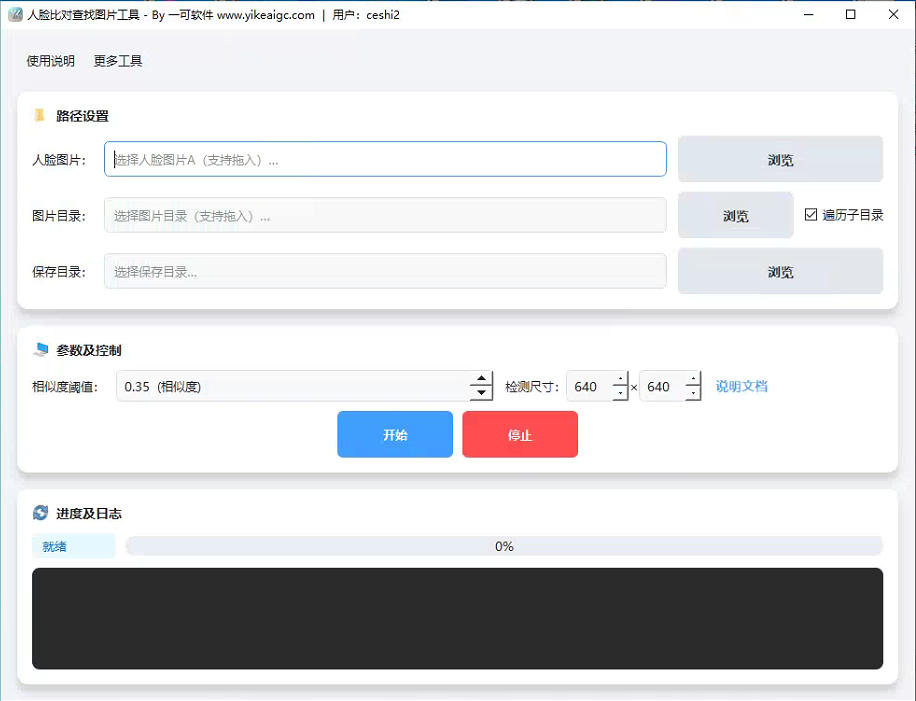
- Select a target face photo: Click the "Select Target Face" button and upload a clear front-facing photo containing the person you want to find. JPG/PNG formats are supported.
- Set the search directory: Click the "Select Search Folder" button and choose the image folder you want to search (subdirectories are supported).
- Configure search options:
- Similarity threshold: Set the similarity level for face matching (80% or higher is recommended). A higher value provides more accurate matches, while a lower value allows greater tolerance.
- Search mode: Choose "Search Only" or "Search and Copy/Move" to automatically sort found images into a new folder.
- Start searching: Click the "Start Search" button, and the software will automatically scan all images in the folder and compare faces.
- View results: After the search is complete, the results list will display matching images. You can click to preview them or open the file location directly.
FAQ
A: Search speed depends on your computer's performance (mainly the CPU and graphics card) and the number of images. Typically, an average computer can process dozens of images per second. The software uses multithreading technology to fully utilize your computer's performance and speed up searches.
A: No. This software is a fully local desktop application. All face recognition and comparison processes are completed on your computer, with no internet connection required, fully protecting your privacy and photo security.
A: Possible reasons include: 1. The target face is blurry, too small, or shown at too much of a side angle; 2. The similarity threshold is set too high; 3. The image format is not supported. Try lowering the similarity threshold or using a clearer front-facing photo as the target.
A: The software supports common image formats, including JPG, JPEG, PNG, BMP, and more. For RAW formats or other special formats, we recommend converting them to a common format before searching.
A: The current version is primarily designed for accurate searches of a single person. If you need to search for multiple people, we recommend running separate searches using photos of different people as targets, or waiting for a future version that includes multi-person search.
Related Tools
Batch PDF Multi-Page Merge Tool
Merge multiple pages of a PDF file onto one page for easy...
Random Image EXIF Information Adder
Batch-generate and write real EXIF metadata for images, s...
Chinese Character Practice Copybook Generator
Generate Chinese character practice sheets online in vari...
CSS Animated Gradient Background Generator
Create animated gradient backgrounds online, with support...