Xiaohongshu iPad Tablet-Style Cover Maker
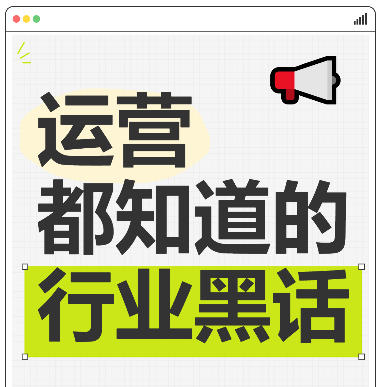
Simulates an iPad tablet frame design, with support for grid backgrounds, highlighted text boxes, and emoji sticker decorations. Ideal for covers featuring practical operations tips and knowledge sharing.
Browser execution mode: Your data is processed in your browser and is not uploaded to the server.
Speed and Stability: Processing speed depends on your device and browser. For large batch work, the desktop version may be more stable.
Loading tool, please wait...
If the online tool fails to load or run, try the desktop tool.https://tools.yikeaigc.com/

Tool Usage
Return to old versionEnter text, then click "Generate Batch Covers"
Instructions
Software Usage Instructions
- Select a creation mode: Click the tabs at the top to choose "Single Creation" or "Batch Creation" mode.
- Set the canvas size:
- Manually enter the width and height values
- Or click a preset button to quickly choose: Douyin 9:16, Xiaohongshu 3:4, Square
- Adjust the tablet frame:
- Set the frame color, thickness, corner radius, and padding
- Choose whether to show the red, yellow, and green dots, signal icon, and Home button
- Set the content area background:
- Default grid: Adjust the background color, grid color, and size
- Solid background: Choose a single color as the background
- Custom image: Upload an image to automatically stretch it to the content area size
- Add text content:
- Click the "Add Row" button to add text
- Each row can have its font size, color, and bold style set separately
- Add an irregular color block background or a highlight box effect with corner control points
- Add decorative elements:
- Select emoji stickers and adjust their size and position
- Enable sparkle decoration effects and adjust their color and size
- Use a custom font: Upload a TTF, OTF, or WOFF font file, and all text will use that font.
- Quick examples: Click the "Marketing Jargon", "Workplace Tips", or "Study Notes" buttons to quickly load preset styles.
- Download the cover: Select the export format and quality, then click "Download Cover Image" to save it.
- Batch creation: In batch mode, enter multiple lines of text (separated by |), select a style template, and click generate to download a ZIP archive.
FAQ
Related Tools
Handwritten Signature Generator and Signature Extractor
Handwritten signature generator and image signature backg...
Xiaohongshu Paperclip Copywriting-Style Cover Maker
Artistic vintage sticky note-style cover, with a beige ba...
Inverted Mirrored Chinese Character Image Generator
Generate inverted/mirrored Chinese character images chara...
Xiaohongshu Notebook-Style Cover Maker
Xiaohongshu-inspired popular notebook spiral-style cover,...
Xiaohongshu Sticky Note Style Cover Maker
Sticky note–style cover with a kraft paper background and...