Bulk Video and Audio Transcription Tool
Batch transcribe video and audio files offline into text, and export to TXT, SRT, VTT, JSON, LRC, CSV and other subtitle and text formats with one click.
Loading tool, please wait...
If the online tool fails to load or run, try the desktop tool.https://tools.yikeaigc.com/
Tool Usage
Return to old versionBatch Video/Audio Transcription Tool(Software Version)
Offline speech recognition models and audio/video decoding require significant computing resources. For a more stable, efficient experience, this feature is available only in the Windows desktop client.
Instructions
Software Usage Instructions
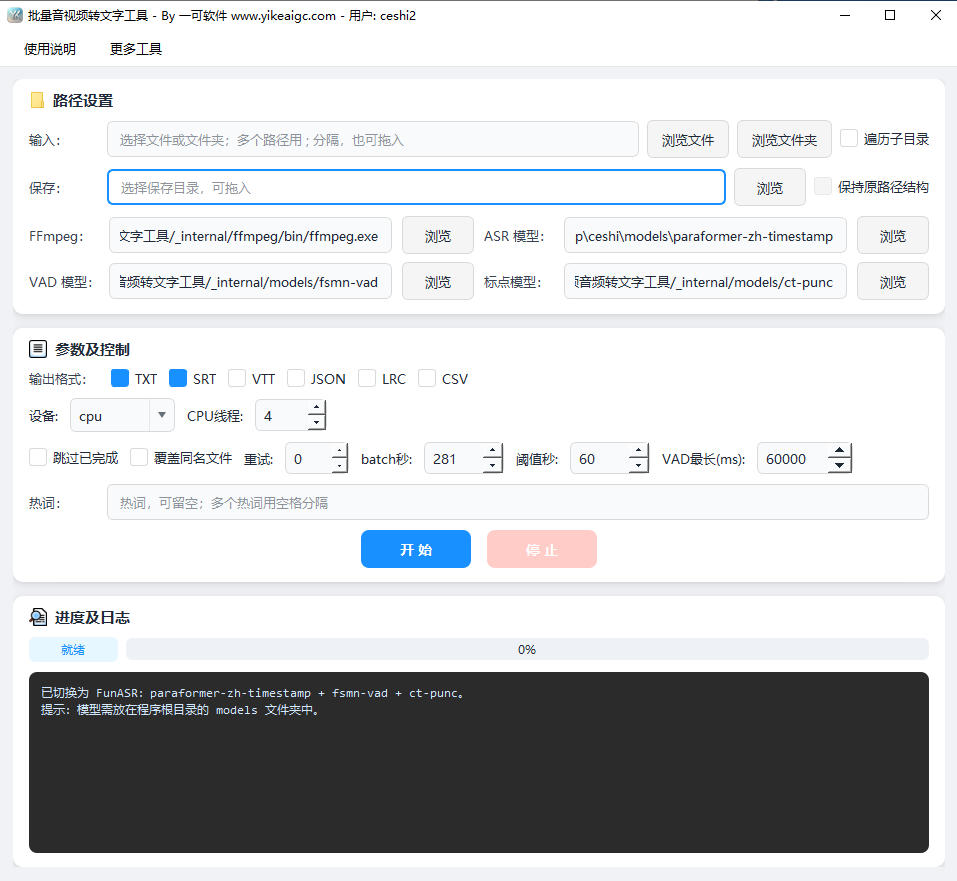
- Add files to recognize: Click the "Select File" or "Select Folder" button to add video or audio files that need to be converted to text. You can also drag files or folders directly into the software window. Batch mixed adding of common video and audio formats is supported, including MP4, MKV, MOV, AVI, FLV, WebM, MP3, WAV, FLAC, M4A, and more.
- Set the save directory: Choose where to save the processed subtitles and text. Drag-and-drop setting is supported. If "Traverse subdirectories" is checked, you can also check "Keep original path structure"; the output files will correspond one-to-one with the directory structure of the source folders.
- Select the output format:
- TXT: Plain text, suitable for organizing manuscripts and meeting minutes
- SRT / VTT: Subtitle formats with timestamps, which can be directly attached to videos
- JSON: Structured data, convenient for secondary development and program processing
- LRC: Lyrics format, suitable for music and audiobooks
- CSV: Table format, convenient for editing and proofreading in Excel
- Configure recognition parameters:
- Model path: Uses the Paraformer Chinese recognition model, FSMN voice activity detection, and CT punctuation model by default
- Batch processing duration: Set the maximum audio duration for a single inference
- Maximum VAD segment milliseconds: Control the granularity of speech segment splitting
- Hotword list: Enter proper nouns, names, and brand terms to improve recognition accuracy
- Skip/overwrite strategy: Choose whether to skip or overwrite existing output files
- Start batch recognition: Click the "Start Recognition" button, and the software will automatically extract audio tracks, split speech segments, run inference transcription, and add punctuation. During processing, you can view progress in the log area. Click the "Stop" button if you need to cancel.
- View and use results: After recognition is complete, go to the configured save directory to view the files in the corresponding formats. SRT/VTT subtitles can be dragged directly into editing software or media players.
FAQ
Related Tools
Video Mashup Tool (Auto-Match Subtitles to Footage)
Intelligently matches subtitle keywords with local assets...
Batch Soft Subtitle Muxing Tool
Batch mux SRT, ASS, and other subtitles into MP4 or MKV w...
Batch Video Smart Trimming and Merging Tool
Intelligently detects and trims video intros and outros, ...
Video Aspect Ratio Adjustment Tool
Professional video aspect ratio calculator and adjustment...
Batch Video Floating Watermark Tool
Batch add floating watermarks to videos, with support for...
Batch Video Shot Segmentation Tool
Intelligently detects video scene changes and automatical...