
Batch Video Smart Trimming and Merging Tool
Intelligently detects and trims video intros and outros, supports removing heads and tails from single files, multiple files, and folders in batches, and automatically groups and merges videos by directory
Loading tool, please wait...
If the online tool fails to load or run, try the desktop tool.https://tools.yikeaigc.com/
Tool Usage
Return to old versionBatch Video Smart Intro/Outro Trimmer & Merger(Software Version)
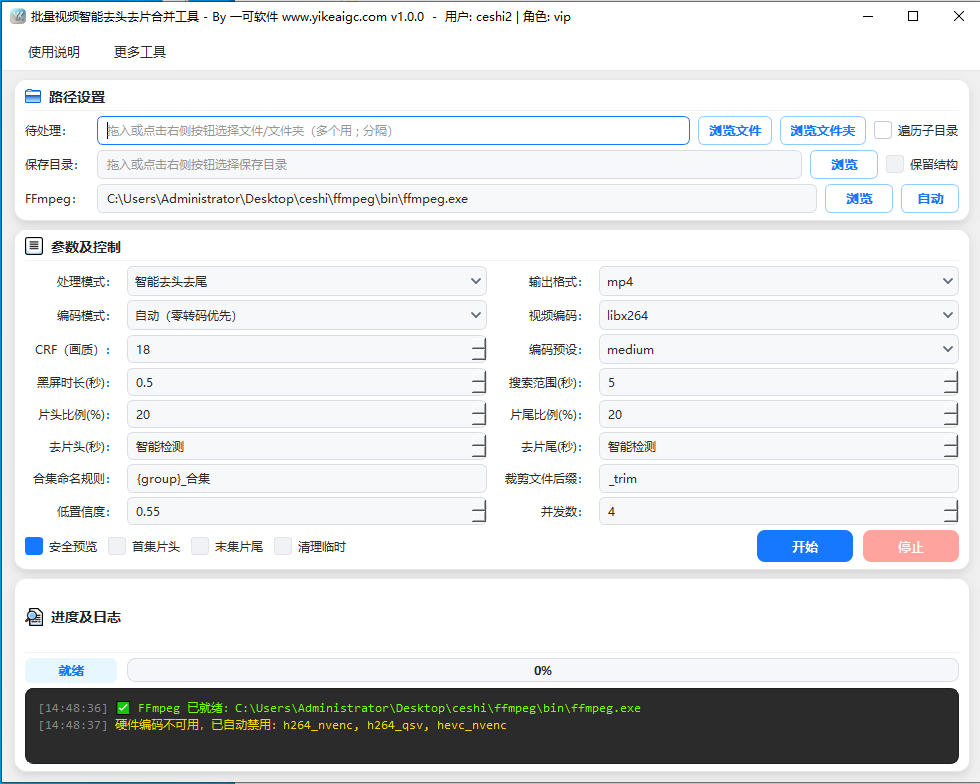
Smart detection and encoding of video intros/outros requires significant computing resources. To provide a more stable and efficient batch processing experience, this feature is available as a Windows desktop client.
Instructions
Software Usage Instructions
- Import video files: Click the "Select File" or "Select Folder" button to import the videos to be processed. Batch import of a single file, multiple files, or an entire folder is supported, and mainstream video formats such as MP4, MKV, MOV, AVI, TS, FLV, and WEBM are compatible.
- Select a processing mode:
- Smart intro/outro removal: Automatically detects the black-screen positions of the intro and outro in each video and trims them, outputting a video with the intro and outro removed
- Remove intro/outro + merge: After trimming the intro and outro, intelligently groups episodes by directory and merges them in natural order into a complete final video
- Detection only: Only analyzes and outputs the detection results (detection_results.json), without actually trimming the video, making it easy to review before processing
- Configure detection parameters:
- Reference intro/outro duration: After you enter an approximate duration, the tool will prioritize matching black-screen points near that time to improve recognition accuracy
- Search range and minimum black-screen duration: Adjust the black-screen detection window and threshold to fit different intro and outro lengths
- Confidence threshold: By default, no trimming is performed when below the threshold, preventing accidental deletion of main content
- Configure output options:
- Output format: Formats such as MP4, MKV, MOV, AVI, TS, FLV, and WEBM can be selected
- Video encoding: Supports software encoding and hardware-accelerated encoding such as NVENC and QSV
- Output directory: Specify where the processed results will be saved
- Start processing: Click the "Start Processing" button, and the tool will automatically complete detection, trimming, and merging according to the selected mode, while displaying progress and logs in real time.
- View results: After processing is complete, you can view the trimmed or merged videos in the output directory. In detection-only mode, you can view the generated detection results file.
FAQ
Related Tools
Batch Video Black Border Remover
Automatically detects black borders at the top, bottom, l...
Batch Video Subtitle Adding Tool
A desktop tool for batch adding subtitles to MP4 videos. ...
Batch Video Duration Spoofing Tool
Batch edit video metadata duration information, supportin...
Pexels Stock Video Batch Downloader
A Pexels video bulk downloader designed for self-media cr...
Video and Audio Parameter Report Export Tool
Read audio and video codec, bitrate, frame rate, sample r...