Batch Corrupted CAJ File Screening Tool
Scans CAJ files in a specified directory, automatically identifies corrupted files, and copies or moves them to a save directory as needed, with support for recursive subdirectories and duplicate-name handling.
Loading tool, please wait...
If the online tool fails to load or run, try the desktop tool.https://tools.yikeaigc.com/
Tool Usage
Return to old versionBatch Corrupted CAJ File Filter(Software Version)
Because CAJ file header checks, tail integrity checks, and large-scale recursive folder scans require direct local file access and heavy disk I/O, this feature is available only in the Windows desktop client for a more stable, smooth experience.
Instructions
Software Usage Instructions
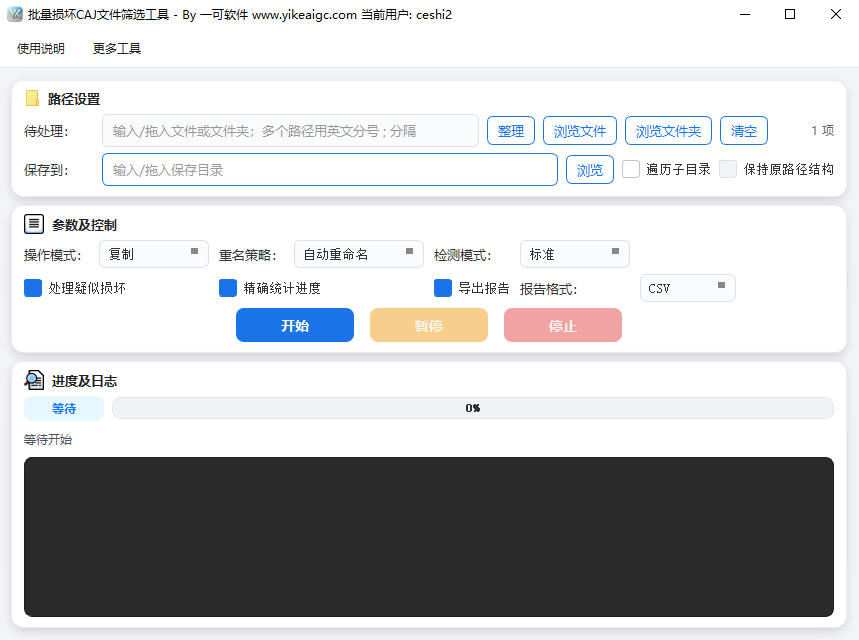
- Select items to process: Enter or drag the CAJ files or folders to be scanned into the "To Process" input box. You can also click the "Browse Files" or "Browse Folders" button to add them. Multiple paths can be selected at the same time, separated by English semicolons ";".
- Traverse subdirectories: When checked, all CAJ files in all levels of directories under the selected folder will be scanned recursively; when unchecked, only the top-level directory will be scanned.
- Set save directory: Select the save directory for damaged files in the "Save to" input box. Manual input, clicking "Browse", or dragging in a path are supported.
- Keep original path structure: Available only when "Traverse subdirectories" is checked. When checked, damaged files saved to the target directory will replicate the original directory hierarchy.
- Select operation mode:
- Copy: Keep the original file and copy the damaged CAJ to the save directory
- Move: Cut the damaged CAJ from its original location to the save directory
- Set duplicate-name strategy: When a file with the same name already exists in the target directory, you can choose "Auto rename" (append a number to the file name), "Skip", or "Overwrite".
- Start processing: Click the "Start" button to begin scanning. The progress bar and log area display the processing progress and list of damaged files in real time. You can click "Stop" at any time to interrupt the process.
- View results: After processing is complete, the log will output the total number of files, the number of damaged files, and the number processed. You can go to the save directory to view the filtered damaged CAJ files.
FAQ
Related Tools
Online PDF Cross-Page Seal Tool
Add a cross-page seal to PDF files online, with support f...
TXT Document Content Batch Replacement Tool
Supports single-file and batch modes, allows multiple set...
XLSX File Keyword Filtering Tool
Quickly filter rows that meet the criteria in multiple XL...
DOCX Image Format Batch Adjustment Tool
Batch adjust the size and alignment of images in DOCX doc...
Long-tail Keyword Filtering Tool
Batch clean long-tail keywords by similarity and rules, a...