Batch Image Skew and Four-Corner Correction Tool
Automatically detects the four corners of photographed documents, receipts, and whiteboards, batch corrects perspective and crops, and supports multiple document enhancements such as grayscale and binarization.
Loading tool, please wait...
If the online tool fails to load or run, try the desktop tool.https://tools.yikeaigc.com/
Tool Usage
Return to old versionBatch Image Four-Corner Deskew Tool(Software Version)
Document corner detection and perspective correction involve heavy processes such as edge detection and contour analysis. To provide a more stable and efficient batch processing experience, this feature is offered as a Windows desktop client.
Instructions
Software Usage Instructions
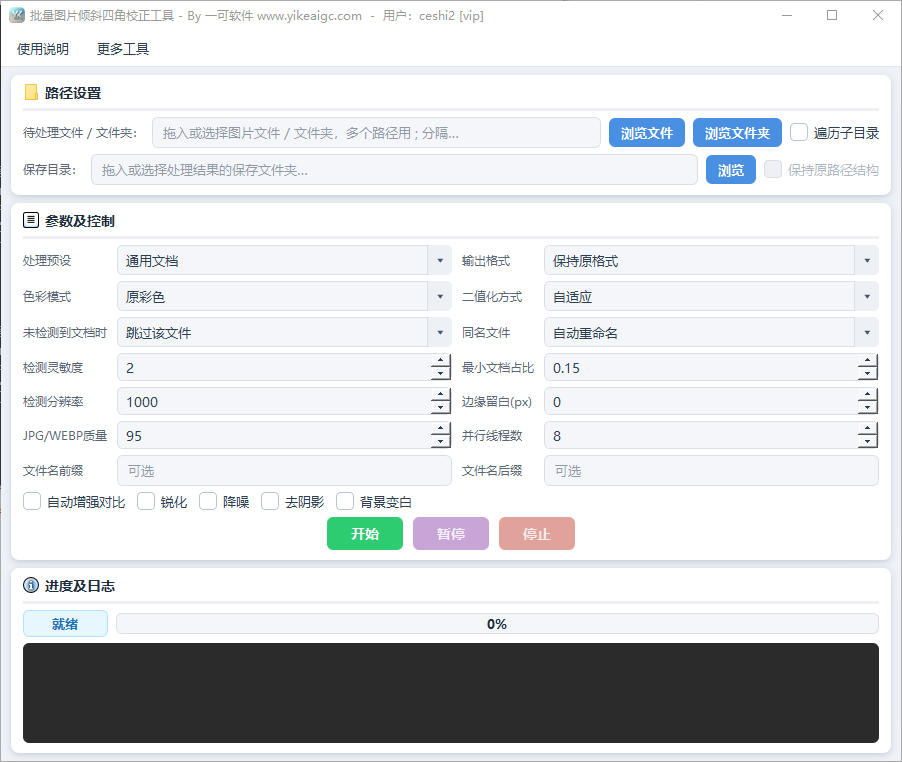
- Add images: Add images to be processed using the "Select File" or "Select Folder" buttons, or drag images or folders directly into the software window. Common formats such as JPG, PNG, BMP, TIFF, and WEBP are supported. Check "Traverse Subdirectories" to also process images in subfolders.
- Select a scene preset: Choose a suitable preset based on the image type to quickly apply recommended parameters:
- General Documents: Suitable for most photographed documents and paper materials
- High-Definition Precision: Improves detection accuracy and enables enhancement, suitable for images with higher clarity requirements
- Receipts/Invoices: Optimized edge recognition for narrow documents such as receipts and invoices
- Whiteboard Enhancement: Suitable for photographed whiteboard and blackboard content, removing glare and shadows
- Black-and-White Scans: Outputs a black-and-white binarized effect, similar to scanner imaging
- Set the output color mode: Choose original color, grayscale, or black-and-white document (binarization). In black-and-white mode, you can further select binarization methods such as adaptive, Otsu, or hybrid enhancement.
- Configure enhancement options: Enable auto contrast, sharpening, denoising, shadow removal, white background stretching, and other processing as needed. You can also set parameters such as edge sensitivity, minimum document ratio, and processing size to adapt to different images.
- Set output options: Choose the output format, JPEG quality, and blank margins, set the file name prefix/suffix, and choose how to handle cases where no document is detected (skip or save the original image), as well as the handling strategy for duplicate file names.
- Specify the save directory and start: After selecting the output folder, click "Start Processing". The software will perform batch correction with multithreading. During processing, you can view the progress bar and real-time logs, and pause, resume, or stop the task.
FAQ
Related Tools
Xiaohongshu Paperclip Copywriting-Style Cover Maker
Artistic vintage sticky note-style cover, with a beige ba...
Batch Image Black Border Remover
Batch-detect and crop black borders, white borders, and c...
Gradient Background Image Batch Generator
Quickly generate gradient background images in various st...
Inverted Mirrored Chinese Character Image Generator
Generate inverted/mirrored Chinese character images chara...
Batch Lossless Image Compression Tool
Batch reduce the file size of images in formats such as J...
Color Matching Recommendation Tool
Professional color palette generator supporting multiple ...