
Batch Video Duplicate Removal Tool
Batch process video materials, supporting multiple deduplication methods such as mirroring, picture-in-picture, scaling, speed changes, and frame extraction, and automatically skipping duplicate files
Loading tool, please wait...
If the online tool fails to load or run, try the desktop tool.https://tools.yikeaigc.com/
Tool Usage
Return to old versionBatch Video Deduplication Tool(Software Version)
Because video deduplication involves complex FFmpeg encoding/decoding and various visual transformations, this feature is available only in the Windows desktop client for a more stable and efficient batch processing experience.
Instructions
Software Usage Instructions
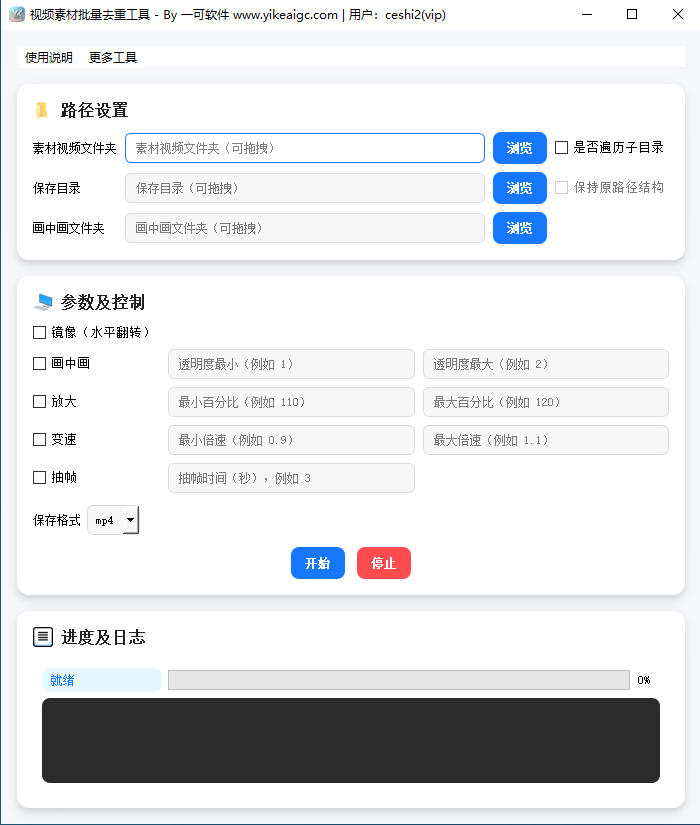
- Select the media folder: Click the "Browse" button or drag a folder directly into the input box to select the media directory containing the videos to be processed. Supports more than ten video formats, including MP4, MOV, AVI, MKV, FLV, and WMV.
- Set traversal options:
- Traverse subdirectories: When checked, video files in all subdirectories will be processed recursively
- Preserve original path structure: When checked, subdirectories will be created in the save directory according to the original folder hierarchy
- Select save directory: Set the save location for the processed videos and optionally choose the output format. When duplicate file names are encountered, a sequence number will be automatically appended to the file name.
- Set picture-in-picture media (optional): If you need to use the picture-in-picture feature, select the folder containing the picture-in-picture media videos.
- Configure deduplication parameters:
- Mirror: Horizontally flip the video
- Picture-in-picture: Randomly select and overlay picture-in-picture media; the opacity range can be set (recommended 1%-2%)
- Zoom: Randomly scale and then center-crop back to the original resolution; the percentage range can be set (recommended 110%-120%)
- Speed change: Randomly adjust playback speed with synchronized audio processing; the speed range can be set (recommended 0.9x-1.1x)
- Frame extraction: Drop one frame at the set interval in seconds and restore the original frame rate to change inter-frame characteristics
- Start processing: Click the "Start" button, and the tool will automatically process all videos. During processing, duplicate media will be automatically identified and skipped using SHA256 hashes.
- View progress: During processing, you can view the progress bar and log information in real time, and stop processing at any time.
FAQ
Related Tools
Batch Video Duration Spoofing Tool
Batch edit video metadata duration information, supportin...
Add Image Watermark to Video Tool
Batch add image watermarks to videos, with support for 3×...
Batch Video Volume Adjustment Tool
Batch adjust video and audio volume, supporting multiplie...
Bulk Video and Audio Transcription Tool
Batch transcribe video and audio files offline into text,...
Batch Video Volume Reduction Tool
Batch remove audio from videos or adjust volume. Supports...
Batch Video Resolution Standardization Tool
A practical tool for locally batch-changing video resolut...
Batch Video Floating Watermark Tool
Batch add floating watermarks to videos, with support for...