
Batch Video and Audio Prohibited Words Detection
Batch-identify local audio and video content, automatically generate timeline subtitles, and scan them against a prohibited words list. When matches are found, a detailed report is output for easy review and correction.
Loading tool, please wait...
If the online tool fails to load or run, try the desktop tool.https://tools.yikeaigc.com/
Tool Usage
Return to old versionBatch Video/Audio Prohibited Words Checker(Software Version)
Local speech recognition and prohibited word matching use significant CPU and GPU memory and rely on offline models such as FunASR. To provide a more stable and reliable experience, this feature is available only in the Windows desktop client.
Instructions
Software Usage Instructions
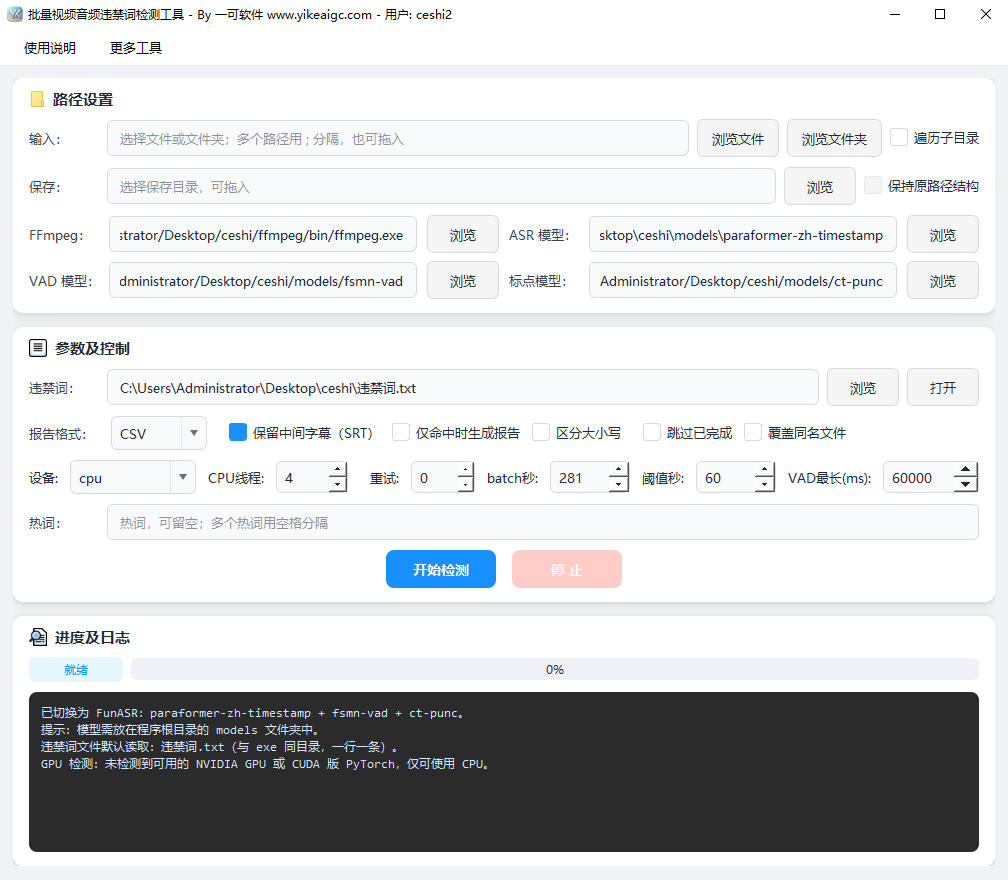
- Select files to scan: Click the "Browse Files" or "Browse Folder" button to add the audio/video files or folders to be scanned. Multiple selection and drag-and-drop are supported. Separate multiple paths with English semicolons. Common formats such as MP4, AVI, MKV, MOV, FLV, MP3, WAV, FLAC, and M4A are supported.
- Set traversal method:
- Traverse subdirectories: When checked, the audio/video files in the main folder and all its subdirectories will be processed recursively
- Keep original path structure: When checked, the output reports will follow the same directory structure as the source folder, and serial numbers will be automatically appended for duplicate names
- Select prohibited words file: By default, the program reads "违禁词.txt" in the same directory as the program. Enter one keyword per line. UTF-8 and GBK encoding are supported, and lines starting with # are treated as comments. You can also click the "Browse" button to specify another text file.
- Configure detection options:
- Report format: TXT or CSV output is available, recording the index number, start time, end time, subtitle content, and matched word
- Generate matched reports only: When checked, no report will be generated for files that do not contain prohibited words
- Keep intermediate subtitles: Also saves the recognized SRT subtitles for convenient manual review
- Maximum VAD segment length in milliseconds: Adjusts the splitting threshold for long sentences; it can be increased appropriately for long videos
- Device and threads: Choose CPU or CUDA GPU inference and set the number of parallel threads
- Select save directory: Set the output location for detection reports and subtitle files. Drag-and-drop is supported.
- Start detection: Click the "Start Detection" button to launch the batch task. The progress bar and log below will display the current file, recognition progress, and match status in real time. You can click the "Stop" button to interrupt processing.
- View reports: After detection is complete, go to the save directory to view the TXT or CSV reports, locate where prohibited words appear on the timeline, and perform secondary editing or modifications.
FAQ
Related Tools
Batch Video Dynamic Timestamp Tool
Batch add dynamically increasing timestamp watermarks to ...
Pexels Stock Video Batch Downloader
A Pexels video bulk downloader designed for self-media cr...
Batch Soft Subtitle Muxing Tool
Batch mux SRT, ASS, and other subtitles into MP4 or MKV w...
Batch Video Volume Reduction Tool
Batch remove audio from videos or adjust volume. Supports...
Batch Video Black Border Remover
Automatically detects black borders at the top, bottom, l...
Batch Video Duration Spoofing Tool
Batch edit video metadata duration information, supportin...