Batch Document Encoding Repair Tool
Automatically detect and restore garbled Chinese text in TXT, subtitles, Word, Excel, PPT, and other documents, with support for batch conversion across multiple encodings.
Loading tool, please wait...
If the online tool fails to load or run, try the desktop tool.https://tools.yikeaigc.com/
Tool Usage
Return to old version
A desktop version is available with more powerful, stable features.
Open desktop version
Windows 10/11 only
Batch Document Mojibake Repair Tool(Software Version)
Mojibake reverse repair and smart multi-encoding detection require significant computing resources. To provide a more stable and efficient experience, this feature is only available in the Windows desktop client.
Auto-detect UTF-8/GBK/GB18030/Big5 encoding
Supports TXT/SRT/Word/Excel/PPT and more
Batch repair large file sets locally to protect privacy
Click to go to the software download page
Software Instructions
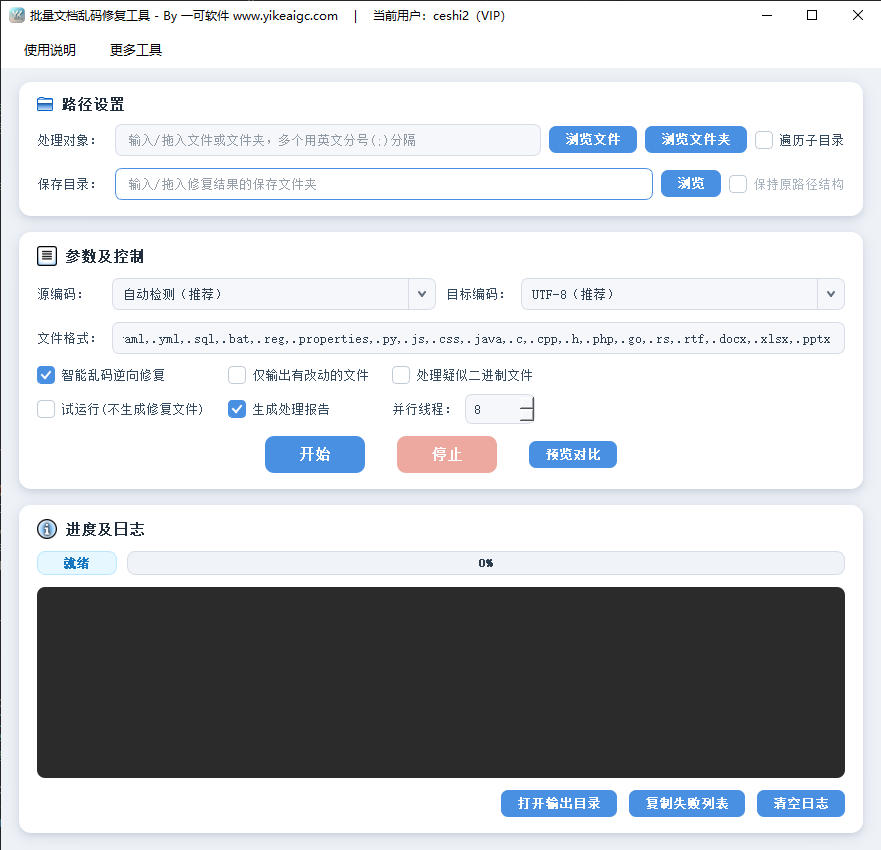
- Add files or folders:Click "Add Files" or "Add Folder" and select the mojibake documents to repair. Bulk import is supported. For folders, enable "Include subfolders" for recursive processing.
- Select source encoding:
- Auto detect (recommended):The program identifies each file's original encoding and restores Chinese text
- Force specified:If auto detection is not ideal, manually specify a source encoding such as UTF-8, GBK, GB18030, Big5, UTF-16, or Shift-JIS
- Set target encoding:Select the output encoding from the dropdown, such as UTF-8 (recommended), UTF-8+BOM, GBK, GB18030, ANSI, or UTF-16, to unify document encoding as needed.
- Configure options:
- Reverse mojibake repair:Restore corrupted characters such as "锟斤拷" and "�"
- Output changed files only:Skip already normal documents to reduce redundancy
- Keep original folder structure:When processing recursively, output to the target folder using the original hierarchy
- Process suspected binary files:Enable as needed. Images and other non-text files are skipped by default
- Preview comparison:Select a single file to compare text before and after repair, then run the batch after confirming the result.
- Start repair:Set the output folder and click "Start Processing". The progress bar shows the count in real time, and the log records successes, skips, and failures.
- View results:After processing, view the repaired documents in the output folder and export a processing report (CSV) for records.
FAQ
A: Supports plain-text formats such as TXT, CSV, Markdown, SRT/ASS/VTT subtitles, JSON, XML, HTML, INI, and SQL, plus Word (.docx), Excel (.xlsx), and PPT (.pptx) documents. Legacy binary .doc/.xls/.ppt files are not supported yet. Please save them as newer formats first.
A: A few short texts or mixed-encoding files may be detected incorrectly. In this case, manually set "Source encoding" to a known encoding such as GBK, GB18030, or Big5, then process again. You can also use preview to compare the repair result before running in batches.
A: Yes. After enabling "Reverse mojibake repair", the program tries to reverse common mojibake caused by UTF-8 being misread as Latin-1, GBK, and more. It uses text scoring and only applies the result when it is clearly more readable, avoiding damage to normal Chinese text.
A: No. Repaired files are saved to the target folder you specify, and original files remain unchanged. If a file with the same name already exists, the program automatically appends a number to the filename to prevent overwriting and keep your data safe.
A: No. All detection and repair are completed on your local device. Document content is never sent over the network, making it suitable for private or confidential materials.
A: Yes. For huge text files, it uses sample-based detection and chunked streaming conversion, buffering and repairing whole lines. This avoids high memory usage and prevents mojibake sequences from being split at chunk boundaries, which could cause repair failure.
A: When the target encoding, such as GBK, cannot represent certain characters in the original text, such as rare characters or special symbols, placeholders are used. Set the target encoding to UTF-8 or GB18030 for broader character coverage and fewer such cases.
Instructions
Software Usage Instructions
- Add files or folders:Click the "Add Files" or "Add Folder" button and select the garbled documents that need to be repaired. Bulk import of a large number of files is supported. For folders, you can check "Include subfolders" for recursive processing.
- Select source encoding:
- Auto-detect (recommended):The program automatically identifies the original encoding of each file and restores Chinese text
- Force specify:When auto-detection is not ideal, you can manually specify source encodings such as UTF-8, GBK, GB18030, Big5, UTF-16, Shift-JIS, etc.
- Set target encoding:Select the output encoding from the drop-down list. Common options include UTF-8 (recommended), UTF-8+BOM, GBK, GB18030, ANSI, and UTF-16, allowing you to unify document encoding formats as needed.
- Configure processing options:
- Reverse repair garbled text:Restore damaged characters such as "锟斤拷" and "�"
- Output only changed files:Skip documents that are already normal to reduce redundancy
- Keep original directory structure:When processing recursively, output to the target folder according to the original hierarchy
- Process suspected binary files:Enable as needed; by default, non-text files such as images are automatically skipped
- Preview comparison:Select a single file to view the text comparison before and after repair, and confirm the result before running batch processing.
- Start repair:After setting the output directory, click "Start Processing". The progress bar displays the processed count in real time, and the log area records details of successes, skipped files, and failures.
- View results:After processing is complete, you can view the repaired documents in the output directory and export a processing report (CSV) for record keeping.
FAQ
A: Plain text formats such as TXT, CSV, Markdown, SRT/ASS/VTT subtitles, JSON, XML, HTML, INI, and SQL are supported, as well as Word(.docx), Excel(.xlsx), and PPT(.pptx) documents. Older binary .doc/.xls/.ppt files are not currently supported. It is recommended to save them as a newer format before processing.
A: A small number of short texts or files with mixed encodings may be misidentified. In this case, you can manually specify a known encoding such as GBK, GB18030, or Big5 under "Source encoding" before processing. You can also use the preview feature to compare the repair result first, then run batch processing after confirming it is correct.
A: Yes. After enabling "Reverse Garbled Text Repair", the program will reverse and restore typical garbled text caused by UTF-8 being misread as Latin-1, GBK, etc., and use text scoring to judge the result. It will only apply the restoration when the result is clearly more readable, avoiding accidental changes to normal Chinese text.
A: No. The repaired results are output to the target directory you specify, and the original files remain unchanged. If a file with the same name already exists in the target location, the program will automatically append a number to the file name to prevent overwriting and ensure data safety.
A: No. All detection and repair are completed on your local device. Document content is not transmitted over any network, making it suitable for handling private or confidential materials.
A: Yes. For very large text files, it uses sampling detection plus block-based streaming conversion, buffering and repairing by whole lines. This avoids consuming too much memory at once and also prevents garbled sequences from being split at data block boundaries, which could cause restoration to fail.
A: When the target encoding (such as GBK) cannot represent certain characters in the original text (such as rare characters or special symbols), they will be replaced with substitute characters. We recommend setting the target encoding to UTF-8 or GB18030, as they support a wider range of characters and can reduce this issue.
Related Tools
Online Article Auto-Formatting Tool
One-click article formatting, supports first-line indenta...
Batch Word Document Formatting Tool
Batch process Word documents, automatically identify head...
XLSX Batch Column Deletion Tool
Batch delete specified columns in Excel files, supporting...